
You already have the paperwork.
Vehicare turns the invoice your mechanic hands you into a complete service history — without typing a word.
And because it knows what was actually done, and how much you actually drive, it works out what’s due next.

Want to try it now? Join the beta
- Free for your first vehicle
- iPhone, iPad and Mac
- No subscription
Maple Street Auto
1450 Maple Street
Invoice 20417
Sept 12, 2026
- Vehicle
- 2019 Mazda CX-5 GT
- Odometer
- 119,874 km
| Description | Amount |
|---|---|
| Oil and filter change | 89.95 |
| Front brake pads and rotors | 412.60 |
| Tire rotation | 40.00 |
| Cabin air filter | 54.20 |
- Subtotal
- 596.75
- Taxes
- 89.36
- Total
- $686.11
Thank you for your business!
Maple Street Auto
1450 Maple Street
Invoice 20417
Sept 12, 2026
- Vehicle
- 2019 Mazda CX-5 GT
- Odometer
- 119,874 km
| Description | Amount |
|---|---|
| Oil and filter change | 89.95 |
| Front brake pads and rotors | 412.60 |
| Tire rotation | 40.00 |
| Cabin air filter | 54.20 |
- Subtotal
- 596.75
- Taxes
- 89.36
- Total
- $686.11
Thank you for your business!
Invoice-20417.pdf
PDF Document · 84 KB
 Vehicare
Work
How it works
The invoice does the typing.
Every maintenance log dies the same way: two oil changes in, nobody keeps typing. Vehicare asks for one gesture, at the moment you’ve just paid and the invoice is in your hand.
- 1
Share the invoice.
A PDF from your garage’s email, a photo of the paper copy, a scan. Send it from Mail, Files or Photos, or paste it with ⌘V.
- 2
It reads itself.
The jobs, the parts, what each one cost, the odometer, the workshop, the date — filled in. A car it hasn’t met yet gets added too.
- 3
Check it. Save it.
You always get the last word. Change anything before it goes into your history.
What’s due
It knows what’s next.
Vehicare knows what was actually done and how much you actually drive, so it works out what comes next. There is no schedule to build — it comes from the invoices it has already read.
Ask Siri, or let it remind you.
- The invoice writes the record.
- The record says what’s due.
- What’s due brings the next invoice.
Coming up
2019 Mazda CX-5
Oil change
Around 12 November, or at 130,000 km
Engine air filter
Around 3 February, or at 134,000 km
Brake fluid
Around 20 June 2027
2019 Mazda CX-5
Maintenance cost
Lifetime
$6,482
This year
$1,208
- Maple Street Auto$3,915
- Riverside Mazda$1,424
- Northside Tire$1,143
Odometer
Lifetime
119,874 km
This year
12,980 km
- 202414,320 km
- 202514,870 km
- 2026until Sep 1212,980 km
What it keeps
What your car really costs.
Lifetime and this year, per vehicle and per garage. And everything else the invoice said:
- Every vehicle you own, lease or rent, with VIN, plate, trim and acquisition date
- Every visit, with the work broken out job by job across more than 60 kinds of service
- What each car has cost you, and what you have spent at each workshop
- Your odometer readings over time
- The original invoice, kept with the visit and viewable any time
Import from anywhere
A PDF, a photo, a scan — whatever you have.
The share sheet
From Mail, Files, Messages or any other app.
Drag and drop, or ⌘V
Drop the file on Vehicare, or paste it.
Photos and the camera
Pick a photo, or scan the paper copy.
Finder and Services
On a Mac, Open With or the Services menu.
Continuity Camera
Scan with your iPhone, straight into Vehicare on your Mac.
Every car, every garage
Why not the app your dealer gave you?
Your carmaker’s app knows only about work done at its own dealers, on its own brand, and you lose it when you sell. Vehicare keeps every car and every garage, including the independent one down the street, and the history stays yours.
iPhone, iPad and Mac
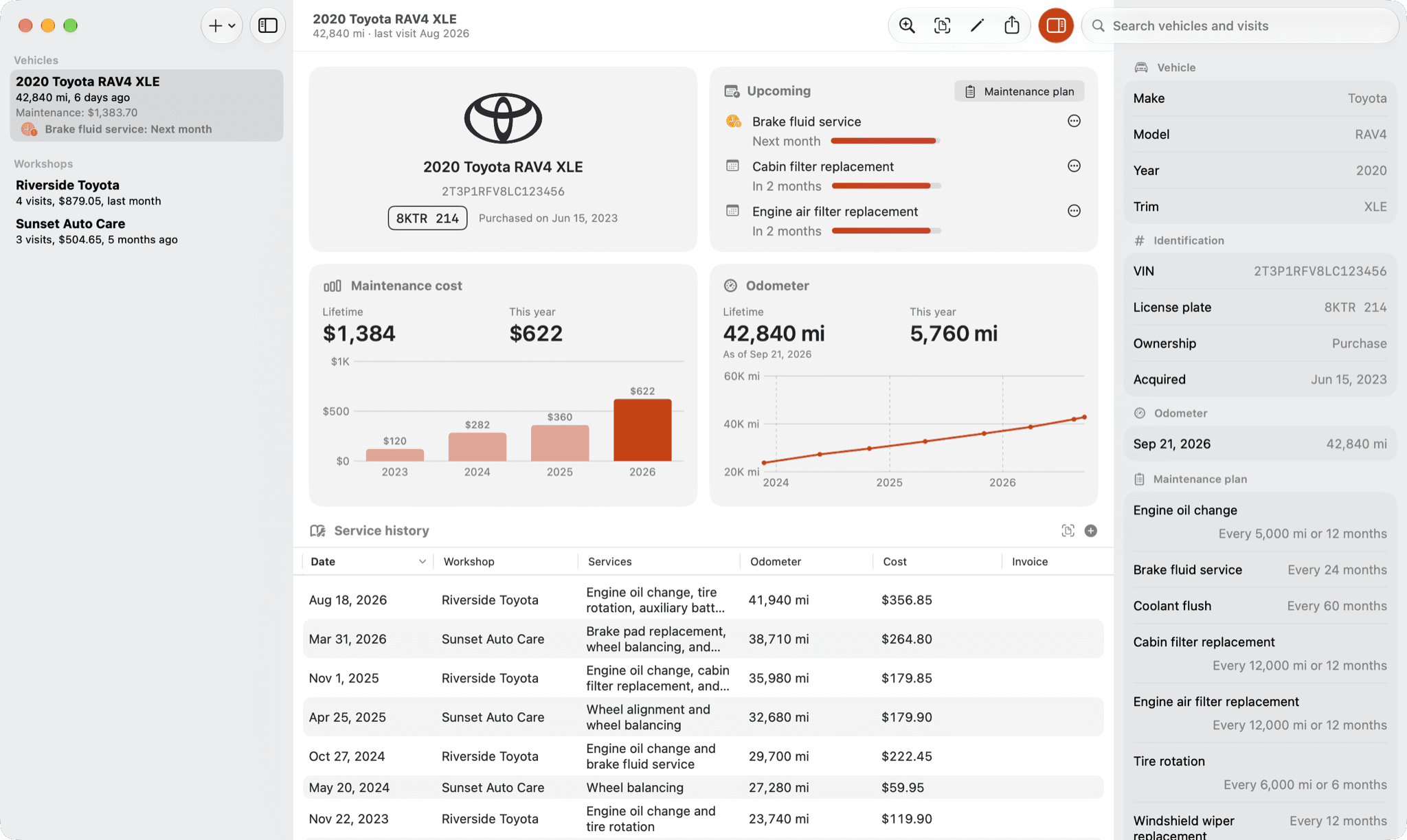
On your Mac, too.
A real Mac app — not a phone app in a window. A menu bar, a table you can work in, an inspector, and Continuity Camera to scan an invoice with your iPhone.
Siri
Ask what you have spent, or when the last service was.
Spotlight
Your vehicles, workshops and visits, one search away.
Shortcuts
Actions ready for Shortcuts and the Action button.
iCloud
Kept in sync across your iPhone, iPad and Mac.
Private by design
Your data is yours. I never see it.
Invoices are read on your device by Apple Intelligence. If you turn on the option, one your device can’t finish reading can get help from Apple’s Private Cloud Compute, which doesn’t store or share it.
Everything you create lives in your own iCloud account, and I only see an invoice if you send me one it read wrong. No accounts, no trackers.
Read the privacy policyPricing
Free to try. One payment. No subscription.
Take a real invoice out of your own glovebox and watch it fill in the visit before you decide anything.
Free
For your first vehicle.
- One vehicle
- Invoice reading included
- What’s due, and reminders
- iCloud sync, Siri, Spotlight and Shortcuts
One payment
For every vehicle you own.
- Every vehicle you own, lease or rent
- Export your history as PDF or CSV — the file you hand a buyer
- No ads
- One purchase for iPhone, iPad and Mac
No subscription. Not now, not later. You buy it once, for iPhone, iPad and Mac, and it’s yours.
About those ads
The free version shows one small card for another independent app, from an exchange built for indie developers. No ad network, no tracking, nothing that identifies you. And it’s gone the moment you buy.

Start with the invoice in your glovebox.
Download Vehicare, share one real invoice, and watch the visit fill in. If it doesn’t earn its place, it cost you nothing.
Want to try it now? Join the beta
Want to see every screen before you start? Read the manual
Questions? Write to me at pascal@polkapps.com