
Settings
Vehicare needs very little setting up. Here is what each setting does.
Finding Settings
On an iPhone or an iPad, tap the gear at the top of the list. On a Mac, choose Vehicare ▸ Settings…, or press ⌘,.
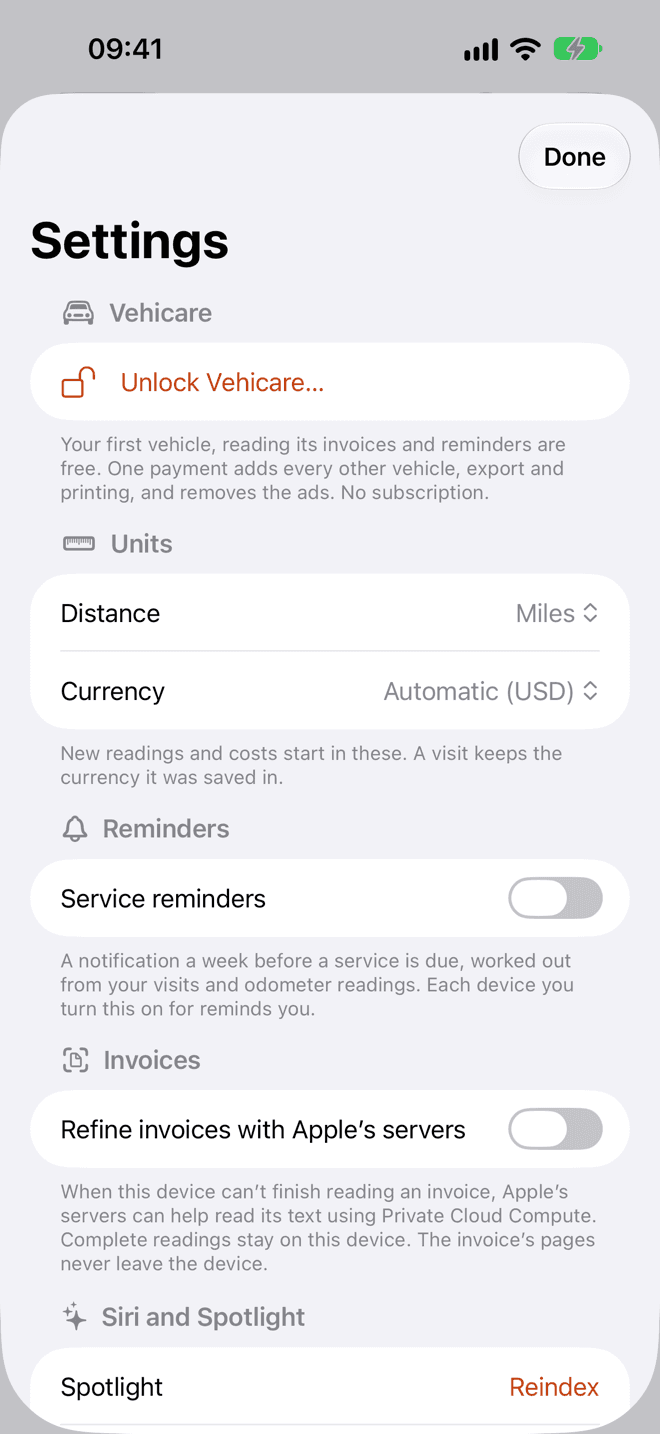
Vehicare
The first section is about the unlock. Unlock Vehicare… shows what it adds, with its price, and a way to restore a purchase made on another device. Once it’s unlocked, it says so. Free, and unlocked has the details.
Units
Distance and Currency start as your device’s own, shown as Automatic. Change them if your car lives in miles and you think in kilometers, or the other way around.
New readings and costs start in these. A visit keeps the currency it was saved in.
Reminders
Turn on Service reminders for a notification about a week before a service is due, worked out from your visits and odometer readings. From the notification, Mark as Done starts the visit, and Snooze 1 Week asks again later.
Each device you turn this on for reminds you, so you can have them on your iPhone only. If notifications are off for Vehicare, Settings says so: turn them on in your device’s Settings, then try again.
Invoices
Refine invoices with Apple’s servers is off until you turn it on. When this device can’t finish reading an invoice, Apple’s servers can help read its text using Private Cloud Compute. Complete readings stay on this device. The invoice’s pages never leave it.
This section appears with iOS, iPadOS and macOS 27. On a device where Private Cloud Compute isn’t available, it says so.
Siri and Spotlight
Your vehicles, workshops and visits are in Spotlight, and Vehicare’s actions are in Shortcuts and Siri. If a search ever misses something, tap Reindex. Open Shortcuts takes you to them. Siri, Shortcuts and widgets shows what you can do.
iCloud
This shows whether Vehicare is syncing with iCloud, and when it last did. If it isn’t, it says why, like iCloud being off for Vehicare, or your iCloud storage being full.
Without iCloud, your vehicles are only on this device. Turn on iCloud, so you keep them if the device is lost.
Data
Back up my data… writes a copy of your vehicles, workshops and visits to a file you keep yourself, in JSON, a format other apps can read. It’s free.
Invoice files aren’t in it: they’re the bulk of what’s stored, and your iCloud account already has them.
About
The last section has Vehicare Help, a short version of this manual inside the app; a link to this manual; the Privacy Policy; Contact Support, to write to me; and Rate Vehicare on the App Store, which helps more than you’d think.
Still stuck, or something doesn’t work the way this says? Write to me.